Refactoring, Boss Monsters, Loot and Locks

I’ve started to feel that the codebase for this game is getting to a point where the volume of code is having an effect on the complexity. It felt to me that every time I wanted to make a small change, regardless of how elegantly I felt I was doing so, I was doing more work than necessary to get it implemented.

Curious to back up my feelings, I imported my repository into a webapp called Gitential that helps visualize various datapoints around a project on Github. The app is fantastic, but what I found interesting was a certain graph that showed that, while the codebase was increasing in complexity initially, the complexity was trending downward over time as the volume of code increased.
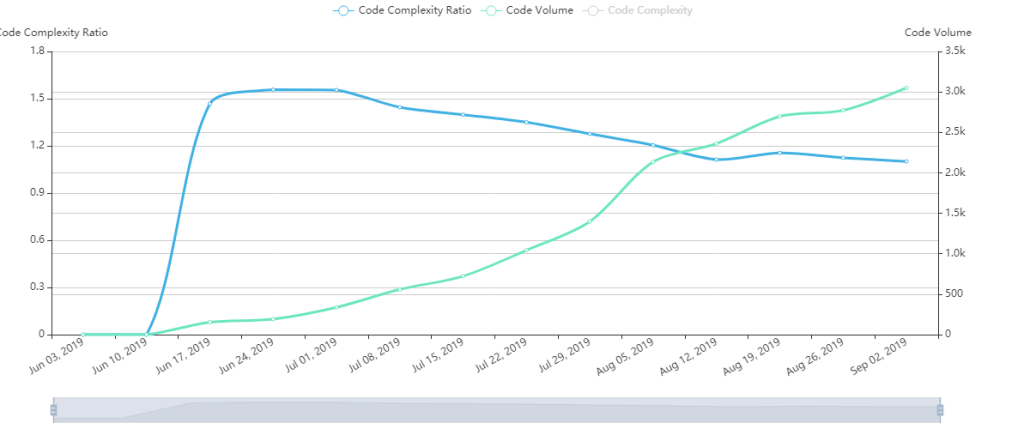
The app maintains that the complexity increases as new code is added to the code base, but decreases as refactoring is done. I make sure to refactor as much as I can, leaving notes in places where a refactoring would be more troublesome.

An Improved Cast

One such refactoring was how we were handling Casts. Casts are how I am handling Entity to Entity interaction in the game world. Basically, an Entity will send out a Cast to query the map at a certain set of coordinates. If it finds something, it’ll trigger an interaction: a message will be displayed, a chest will open up, a warp tile will send you to another part of the map:
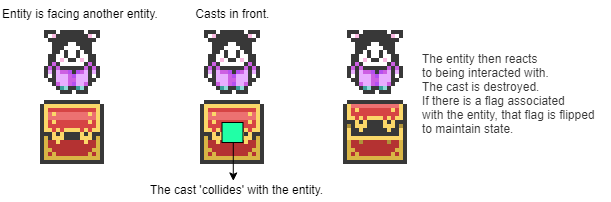
A brief overview of how casts work in the game.

A reference to a group of Casts that lived in the Scene object was passed around to every Entity object that exists on the Scene via their constructors. When an Entity “casted”, it added its Cast to this object directly. This tight coupling was very bad for complexity. It meant that my classes knew too much about other classes.

So I tore that Cast group out of the constructors of all of my Entities, and instead had the Entity emit a Cast event that the Scene was listening for. That way the implementation was decoupled.

I also gave the Cast a little bit more. I made an enum for the type of cast being casted– I wanted to differentiate between a cast that was sent out (up, down, left or right) from the Entity and a cast being sent below it to query underfoot. I named them reach and pressure Casts, respectively.

I also added an event to the Cast that will emit riiiight before it fizzles out and dies forever, sending back valuable information to the caster about the Entity that it found. This allows Entities to query other Entities.

Boss Monsters

One of my epic milestones was to create a a special type of battle for boss monsters. These would be battles that were triggered by NPCs on the world map, and upon winning would flip a Flag or series of Flags in the world.

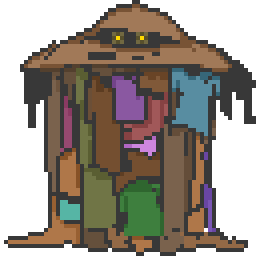
I designed some bosses, wrote some dialog for them, and placed them on the world map. I wanted the boss’s death to trigger a key item to spawn in the space that it died on.
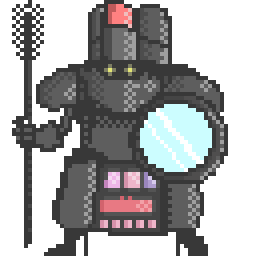
I wrote a method that would iterate through every Entity on the map and show or hide it based on whether the flag was flipped. When hidden, the Entity would query underfoot using a Cast before disappearing and turning the tile’s collision off.

The result was an experience where the player triggers a battle by talking to the boss monster, wins the battle, the boss Sprite is gone and in its place was an item to collect.

Loot

I created a new class of Item that is specifically made for selling: Loot. I designed things like jewels and precious gems and set some monsters to have a very small chance of dropping them.

When the store is implemented later, the player will be able to sell them for large amounts of gold.

Locked Doors and Chests

I also introduced a new type of Entity: locked doors and locked chests. These can be opened by collecting silver and gold keys respectively. The chests can contain great treasure like the above-mentioned Loot or KeyItems, and the locked doors can gate player progress.

These can be really useful tools for creating puzzles and guiding the player through the game.

Moving on, the next big step is adding some more features to the battle system. I’m in the middle of scoping this out and designing some of the new elements, but I look forward to sharing my progress there in the coming weeks!

Flags, State and Key Items

My goal this weekend was to implement the concept of flags and state into the game.

I was using a system of flags for keeping track of which chests were opened, but nothing else. I decided to scrap that system, and migrate it and other pieces of state over to a new system.

I’ve included the indecipherable scribblings of a madman for your reference:

So what we have here is…

We have three tables, one for NPC (non player characters), one for Dialog, and one for Flag. NPCs carry an array of NPCDialogs, each of which hold a reference to an id in the Dialog table. The NPCDialog has an array of Flag ids, which are tied to flags in the Flag table. The NPC, when interacted with, will then say the dialog that is appropriate to the game state, as dictated by the flags that have their flagged property set to True. The cool thing is that NPCDialogs aren’t just tied to a single flag, they can also rely on multiple flags being flagged. We reduce to find the dialog that best corresponds to the current game state:

  private getCurrentDialog() {
    const sm = State.getInstance()
    const dialog = this.dialog.reduce((acc, dialog) => {
      if (sm.allAreFlagged(dialog.flags)) {
        acc = dialog;
      }
      return acc;
    });
    return dialog.message;
  }

So for example, when the game starts, Lo doesn’t have her hearing aids. When she talks to Ryan, she can’t hear him. But when she gets the hearing aids on the table the flag for getting hearing aids is flipped to true, and the Ryan NPC object now knows what dialog to say in response. Here it is in action:

An actual exchange that happens every day of our lives.

The potential that this opens up for the game is actually pretty grand. Now we can dictate game state with a really granular system of flags. I hope to expand this system to apply to item presence, NPC position and other things. This is one of the key parts of the game I needed in place in order to complete the loop.


Key items were also introduced this weekend. Collecting the key item will flip a flag, and as seen above, cause other NPCs to change their dialog in the world. Pretty cool!

I also implemented an item preview functionality that adds a panel for seeing a small preview of the focused item in the UI.

This week, I think I want to start building out the first dungeon. It’ll be a simple affair. I want to implement a few floors, some treasure, and a final boss. I think it’s doable!

Spell Effects and XP Bug Fixes

I was feeling a little defeated after not making much progress this weekend on things like game state. However, I was able to create a very basic game loop, and surprisingly found myself getting lost in it for a few minutes. I would encounter enemies, take them down, acquire coin and experience points and items, use the items to recover my lost HP, and repeat until I was growing strong enough to one-shot the enemies.

I was surprised to find that I was enjoying the very simple loop I made. It felt very bare-bones to be sure, but there is something magical about seeing code you’d written just come together into something cohesive.

I spent most of my time working on fixing bugs or implementing small visual changes here and there. Here’s what I did this weekend:

Fix XP Bug that would break XP bars and the toNextLevel calculation.

For some reason, the way I’d written the code to handle leveling up was not taking into consideration the scenario in which the character beat an enemy that caused them to level up more than once. The calculation was causing some strange numbers to appear in the toNextLevel calculation. Eventually I landed on a solution that used recursion:

  public gainExperience(experiencePoints: number) {
    let leveledUp = false;
    const total = this.currentExperience + experiencePoints;
    const overFlow = total - (this.toNextLevel * this.level);
    while (total > this.getExperienceToNextLevel()) {
      this.levelUp();
      leveledUp = true;
      this.currentExperience = 0;
      this.gainExperience(overFlow);
    }
    this.currentExperience = total;
    return leveledUp;
  }

Recursively call gainExperience, passing in the overflow experience from each previous call, until there is no more overflow experience. I was delighted to see that it worked like a charm.

Here is the status screen showing off experience bars and character stats. Tuzi is a superbun,

Add some animations for attacking and healing.

Added some sparkles and sound effects for hitting and healing. Here is the healing animation in action.

Sparkly~!

Implement a class and leveling system

I made a database of classes and associated each party member with a class. In the image above, you can see that Tuzi is a Bunmage. I wrote a series of getters in the PartyMember class, one for each stat, that takes into account the stat modifiers of the class associated with them, as well as a modifier based on their level. So it looks like this:

STR = partyMember.baseSTR * class.baseSTRModifier * partyMember.currentLevelModifier

So warriors with slightly higher STA and STR modifiers will see a linear trend upward in that stat, all driven by level increases. I spent a little bit of time thinking about this problem, and even asked a question on Quora about it, but eventually went with this method as it’s easy to tweak later on.

I found something interesting — with this, the basic game loop was complete. I was able to do a rudimentary form of grinding on monsters, gaining levels, gaining items, gaining coin, and using items to replenish HP. And with the leveling system in place, I was able to feel my characters getting stronger as they took less damage from enemy monsters, and defeated them more easily.

I noticed that I was falling into this comfortable gameplay loop, and once I realized that I’d made something that captured my attention like that, it was a very nice feeling indeed. It made me want to do even more to polish and expand the game.

HP Bars and Item Use

I’ve been making some more progress lately trying to tie up the game loop. Battles are running smoothly with items, coins and experience being rewarded at the end. Lo, ducks and rabbits are slaying monsters. Things are working.

Today I took a huge chunk out of the backlog —

I implemented a Party Menu Scene, where you can see the members of the party and their current HP and MP. I implemented a small system for traversing and selecting the panels, borrowing some code from the UI panel classes and extending upon them. For some reason, while I was aware of `super` in a constructor being a way to call the constructor of the parent class, I totally blanked on the fact that it’s also a gateway to the parent class’s methods as well. I actually was reminded of this at my job, when I was overriding a method without actually needing to, and someone called it out in code review.

For example, when I extend upon UIPanel, I want to add functionality to its blurPanel method while still maintaining the original functionality, I just call the the method on super.

// The code inside `PartyMemberPanel` that animates the character
// sprite when the panel is focused/blurred, in addition to 
// performing necessary focus logic from the base class.

  public focusPanel() {
    super.focusPanel();
    this.sprite.anims.setRepeat(-1)
    this.sprite.anims.play(`${this.sprite.texture.key}-walkDown`, 
    false);
  }

  public blurPanel() {
    super.blurPanel();
    this.sprite.anims.stop();
  }

Maybe a ‘duh’ moment for many, but an ‘oh, right’ moment for me all the same.

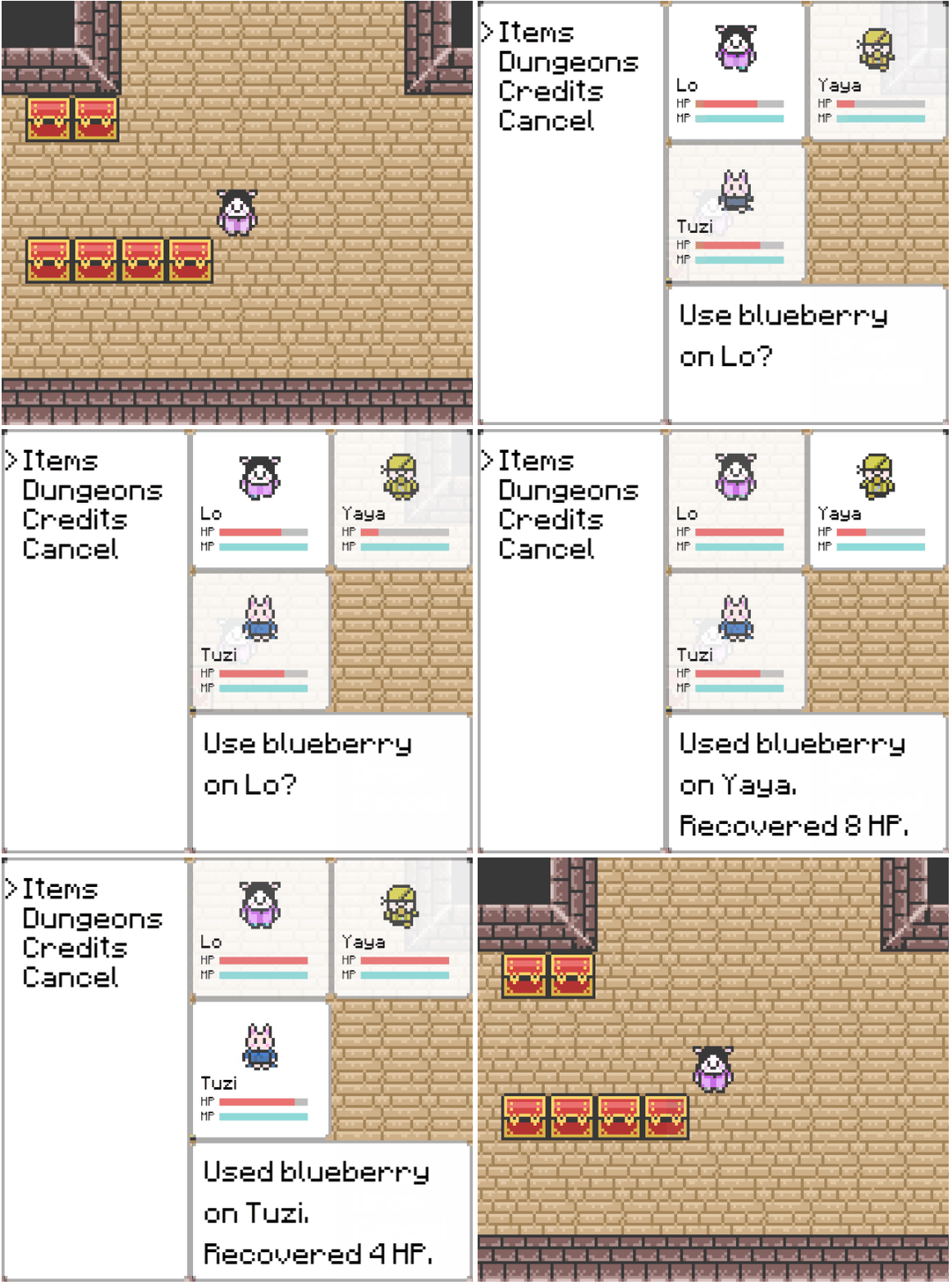
We can use items on our little friends to get their HP up after a long battle.

The UI logic gets a little complicated in the menu scene, so I split out the Party Panel logic into its own scene. That way, we can compartmentalize the keyboard mappings and don’t really have to keep track of a long and complicated focus history. Now we just start the new Party Panel Scene when we select an item to use and our logic stays clean(er) because Party Panel Scene doesn’t have to care about Menu Scene. I want to use this pattern more in the future. It’ll come in handy when I introduce equipment and spells.

I made the HP and MP bars from a Bar component that takes in a current value and a max value and tweens the bar as the value changes. Then I just hooked up each character in the panel to the bar. The cool thing about the bar is that I can use it in different scenes now too. The combat scene will have bars for monsters and teammates, and will go a long way in giving the player visibility into the state of the battle.

The Battle is On

Though I haven’t had as much time as I would have liked to work on this game, I am still making some progress. I’ve been mainly working on the battle system in my free time after work.

You can see in this gif that we’ve got attacking, battle messaging, loot messages and win messages all working.

Our characters are super-powered for debug-mode.

I made an easy, compose-able tweening system for animating the characters attacking and damage numbers streaming. I also converted the setTimeout‘s and Promise‘s to use ES8’s Async/Await syntax, so the async code is a lot cleaner.

Even though I really like the asyncAction y–>then do x syntax:

        this.playCombatText(text).then(() => {
          return resolve(results);
        });

It really is no match for how clean this is:

await this.playFadeUp(text)
      return resolve(results)

You may also notice that the resolution of the font is improved. The previous version was made with a much smaller aspect ratio, blown up four times. I recently made a very large change that bumped up the resolution on all my assets and text, which improves the quality of the visuals and also the frame-rate somewhat.

I was also able to create a short video for my wife’s birthday using the game’s credit sequence.

A cute birthday video for Lo with a reveal at the end!
The TL;DR of the above movie

I want to continue to flesh out the battle system, eventually moving to display health bars, actually distribute coins, experience and items, and adding in a couple of spells for Tuzi the rabbit to cast.

Quora

About two months ago I started work at a dream job.

Working at Quora has been one of the greatest experiences of my professional life. There isn’t a day that goes by that I don’t think to myself how blessed I am. Five years ago I was reading books about arrays in PHP and trying to wrap my head around JavaScript objects. Now I’m working at an amazing company solving incredibly cool problems in Silicon Valley. It’s still hard for me to accept it as a reality.

This week was Offroad. It’s essentially a week-long hackathon where employees pitch ideas to the company and then take a week to implement solutions or new features. There were incredibly cool ideas, like improved embedded links in Quora answers, making asking other users for answers a more social experience, identifying ‘trending’ answers and sharing them with even more users etc.

I joined a group centered around the concept of debate and discussion on Quora. Basically, give users better tools to see different sides of an argument or discussion, allowing them to filter through answers that are tagged with certain viewpoints, and enabling the reader to select certain quotes in an answer to directly comment on.

The whole thing was very ambitious, and I think a few people doubted that what we were pitching could be done. But during the first couple of days of the Hackathon, we took some time to pare down the idea into a scope that was doable and sped off. It was four interns and four full time engineers.

Collaborating on the idea and seeing it come to fruition was such an awesome experience. We spent five days in various meeting rooms just shooting ideas back and forth, asking people to write some code we needed in some other place, mocking up interfaces quickly, drawing diagrams on whiteboards… I had an absolute blast.

When it came time to present our project to the company in a closed beta, we found adoption of the features was rapid and enthusiastic. People were commenting on quotes and starting side discussions based on specific points, tagging their answers and taking sides. It was really really cool to see.

After a company-wide vote among ~90 projects, we were actually voted the best idea of all of them, which just made me even happier.

It’s been a great couple of months. I can’t wait to see what else we can do to make Quora great.

Boxart and Battles

For the past couple of days, I’ve been slaving over a battle system for the game. I’ve never had to write something like it before, so I find myself trying different things, seeing where they fail, and iterating off of the parts that work. It’s a lot of fun, and I am getting it to a pretty serviceable place. Here is a peek at what the battle scene looks like at the moment:

Attacking some baddies.

The background tiles are borrowed from Link’s Awakening. I was able to reuse the UI class I used to create in game menus to create a battle interface, which I am pleased with. Here’s a preview of some of the monsters I’ve drawn so far.

Underneath all of this, I have two 3×3 grids that allow me to easily place combatants on them. I also have the ability to query each cell of the grid for its current occupant. It also leaves me with some room in the future for doing cool attack patterns, like full-grid attacks, or row attacks, or column attacks. In addition, I can see the grid pattern also having hazards on grids, and some attacks being able to push combatants forward or backward. I set myself up pretty good with that I think.

While on the plane to New York, I whipped up a pretty cool piece of art for the game that I think I’ll use as the ‘box art’.

Adventures in Dialog

I had a weird challenge with dialog. Given the below container, how can I fit text into it in such a way that it’ll cut off at the end of the dialog if it’s too long? It seems like a simple problem on the surface, but was a little bit squirrely in practice. The solution unexpectedly came to me with the help of my many month-long algorithm/data-structures study marathon.

Essentially a page from the book that is this game.

Imagine you had a box of apples. The box can hold 25 pounds of apples. You have a machine that is really good at stuffing apples into those boxes. So efficient that it’ll cut an apple in half to get it to be exactly 25 pounds. But we don’t want no half apples!

The same issue applied here: I have an array of dialog messages for each dialog box. Some messages in the array are larger than the box can hold. We could just say “when the message gets 125 characters long, just cut the message at the 125 mark and send the remainder to the next box.” But that sucks.

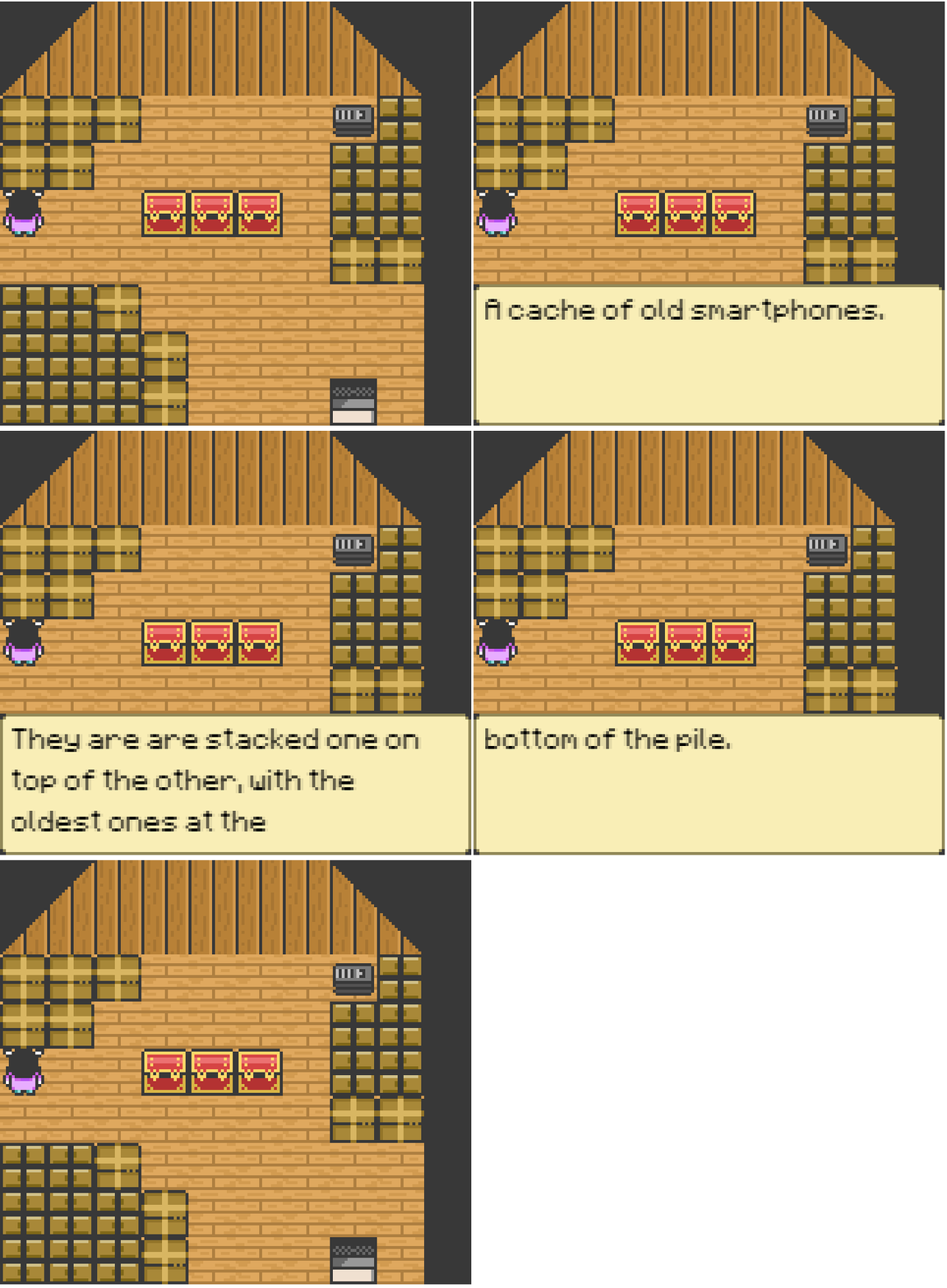
So to go back to the metaphor, we can see where we are going to cut the apple, and then dial it back a bit. Here is what the message in the dialog looks like when we cut through the apple:

…oldest ones at the b—

With the following code, we can be more picky about where we cut the message, cutting the message at a predefined point and the walking it back a bit until we find a space.

    messages.forEach(message => {
      const textArray = message.split("");
      while (textArray.length) {
        let start = 150;        
        // iterate backward until we find the closest space
        // That way we don't cut the word in half.
        while (textArray[start] && textArray[start] !== ' ') {
          start--;
        }
        result.push(textArray.splice(0, start).join(''));
      }
    });

Now we get cleanly cut messages that will always fit inside of the dialog nicely:

Castaway

The next thing I wanted to handle after getting grid movement and “collisions” working was how to have the character interact with the world. When I walk up to an object, I want to be able to press a button and, if I am facing that object and it is interactive, be able to learn something about that item, or trigger some event.

The issue comes with how to know that I am collided on the correct face with an object. Our objects and players and NPCs fit neatly inside of their grid, and at no point do they ever really come into contact with each other, as far as the collision-detection engine is concerned. It’s like all elements are playing this incredibly strict game of I’m-Not-Touching-You-I’m-Not-Touching-You-I’m-Not-Touching-You!

I looked online to see how other people might be solving this problem, but came away with some pretty strange suggestions. One suggestion was to make the object’s hit-boxes ‘bleed’ out of their grid, so that the player can actually collide or overlap with it in a way the collision engine understands. Another suggested that the player’s hitbox be elongated on its forward facing side, so that it can ‘probe’ the grid in front of it for a collidable object. To translate this into metaphor, it’d be like a guy holding a cane out and spinning around the room until he hits something. Works for blind people. But not for our game, I don’t think.

I then remembered during a game jam at Warpzone, a coworking space for game and web developers, people were mentioning this idea of Raycasts being a good way of querying objects in a 3D environment. Essentially what happens is a ray is sent out in the direction you specify, and if it hits something, you can get data on that item it hits, effectively being able to perform events in response to the collision. It’s like echolocation. Exactly like echolocation. How is it not like echolocation?

I figured, why not try that in Phaser. So I made a Cast class:

export class Cast extends Phaser.GameObjects.Sprite {
  private currentScene: Phaser.Scene;
  constructor({ scene, x, y }) {
    super(scene, x, y, null);
    this.currentScene = scene;
    this.currentScene.add.existing(this);
    this.initSprite();
    this.displayWidth = 8;
    this.displayHeight = 8;
    this.visible = false;
  }
  private initSprite() {
    this.setOrigin(0.5, 0.5);
    setTimeout(()=>{
      this.destroy();
    },200)
    this.currentScene.physics.world.enable(this);
  }
}

So the idea is it’s this ephemeral sprite (it kills itself after 200ms) that gets placed somewhere and checks if what it collides with is an interactive object. Inside of my Movement class, I added two methods:

class Moveable extends Entity{
......
  public queryObject = createThrottle(300, () => {
    const coords = this.getTileInFront();
    this.casts.add(
      new Cast({
        scene: this.currentScene,
        x: coords.x,
        y: coords.y
      })
    );
  });

  public queryUnderfoot = createThrottle(100, () => {
    this.casts.add(
      new Cast({
        scene: this.currentScene,
        x: this.x,
        y: this.y,
      })
    );
  });
......
}

Basically, place a Cast down on the tile in front for queryObject, and place a Cast on the current tile for queryUnderfoot.

The throttle is a function that makes it so I can’t do this more than 1 time every 300ms.

export const createThrottle = (limit, func)=>{
  let lastCalled: Date;
  return ()=>{
    if(!lastCalled ||  Date.now() - lastCalled.getTime() >= limit){
      func();
      lastCalled = new Date();
    }
  }
};

Keep that little number handy for interviews~

And then in my update loop in my scene, I just check the collision between a cast and any other kind of object.

The result is a Player with the ability to query objects in front of it or underfoot. If I were to make the casts visible to the naked eye, it would look something like this:

Lo is able to query everything in the room, including things she’s never interacted with over the course of our marriage.

See? Echolocation.

Next I’ll go over how I decided to handle dialog and item acquisition! That chest up there is looking mighty tempting. I wonder what’s inside!

Gridlocked

One of my favorite Gameboy Color games when I was growing up was this obscure, horribly-translated Japanese RPG called Lufia: the Legend Returns. I think it was universally panned for being too bland, or too dissimilar from its wildly successful predecessors. But 12 year-old friendless me would spend hours huddled under a blanket, under the dim half-light of that terrible Gameboy Color peripheral.

It actually looks pretty good for what it was. I’ll still play this once a year or so.

This is kind of what I hope to set out to mimic with this side-project.


One of the first things I wanted to tackle was the ability to move on a grid. I thought a bit about it, and initially thought I’d use Phaser’s in-game physics engine for colliding against walls, but I soon realized that the physics engine wasn’t going to cut it here.

For precise grid movement, we needed something more logical.

The problems we need to solve for are:

  • Moving a character on button press to the center of an adjacent tile.
  • Keeping the character from moving into a tile we deem un-enterable
  • Keeping the character from moving off the map altogether.

The first thing we do is, in our scene’s init function, we instantiate a map, then add a tileset to it. Our tileset is going to be composed of tiles of 16×16 pixels, with no spaces or margins in the image map.

  init(data) {
  ...
    const { map, tileset } = data;
    this.map = this.make.tilemap({ key: map });
    this.tileset = this.map.addTilesetImage(tileset, tileset, 16, 
    16, 0, 0, 1);
  ...
  }

Then, in the create lifecycle hook of our scene, we create background and foreground layers from our tile JSON files. The string in the first argument is the layer’s name, specified in Tiled.

create():{ 
...   
    this.backgroundLayer = this.map.createStaticLayer(
      'background',
      this.tileset
    );
    this.foregroundLayer = this.map.createStaticLayer(
      'foreground',
      this.tileset
    );
...
}

This will lay out the tiles as we’ve created them in tiled, metadata and all! And we do have metadata associated with these tiles already: each tile has a collision property set to either true or false.

Next, I created a base class that extends on the Phaser.GameObject.Sprite class called an Entity.

class Entity extends Phaser.GameObjects.Sprite {
  protected currentMap: Phaser.Tilemaps.Tilemap;
  protected currentScene: Phaser.Scene;
  protected currentTile: Phaser.Tilemaps.Tile;

  constructor({ scene, x, y, key, map }) {
    super(scene, x, y, key);
    this.currentScene = scene;
    this.currentScene.add.existing(this);
    this.initSprite();
    this.currentTile = this.getTileBelowFoot();
    this.currentTile.properties["collide"] = true;
  }
  private initSprite() {
    this.setOrigin(0.5, 0.5);
    this.setFlipX(false);
    this.currentScene.physics.world.enable(this);
  }
  protected getTileBelowFoot() {
    const tile = this.currentMap.getTileAt(Math.floor(this.x / 16), 
    Math.floor(this.y / 16), true, "foreground");
    return tile;
  }
}

This will serve as the base class for not only what will eventually be our Player, but NPC‘s, and even treasure chests. When we instantiate it, it adds itself to the scene, enables physics on itself, and sets the sprite’s origin to the center of the sprite.

Notice another thing we do here: In the constructor, we find the current tile we’re standing on and set the collision on it to true. This means that all entities (non-player characters and the player character alike) essentially take up a space on the tile. You may be thinking: “But Daruma, what happens when the entity is a Moveable entity, and leaves the tile it was spawned on?! Wouldn’t that leave the tile collidable, like a slug leaving a trail of gross?!” And I would answer: “Dear reader, that is a convenient and thoroughly worded question that can serve as a unique segue into Entity’s relative:

Moveable

I extended on this one level further, creating a class called Moveable. Moveable will be what our NPC and Player characters will extend on. Moveable holds all of the logic for traversing the tilemap. Moveable can do a few things, all having to do with direction, movement and tile querying. Moveable is a good boy. He:

  • Maintains a moving state.
  • Has a velocity to control how fast it traverses the tile.
  • Can check underfoot to see if we’re stepping on anything interesting.
  • Can check one tile ahead in the direction it’s facing using a Directions enum I made to standardize the cardinal directions.
  • Is able to create a target that the sprite then advances toward.
  • Reveals an API for programmatically controlling movement (think: NPC meandering cycles…)
  • Upon moving, will set the vacated tile’s collision property to false, and the destination tile’s to true.

You can take a look at the code here. It’s a bit verbose to get into on a non-technical blog, and I feel I’ve already gone a little too far for a simple diary.

Controllable

The final piece to this puzzle is Controllable. Instead of creating an even deeper class hierarchy (because TypeScript doesn’t allow for multiple-inheritance, and call me barbaric but I feel their mixin solution is ugly) , I decided not to extend from Moveable, and instead allow you to compose the class with Controllable.

Controllable handles inputs from the keyboard (arrow keys). It basically takes those inputs, and then tells Moveable to move according to whatever button was pressed. Think of it like puppet strings that attach to the player.

So it looks like this:


Circles with arrows.

Player extends from Moveable, which extends from Entity which extends from Phaser’s Sprite class. Controllable attaches to Player through a constructor. NPC does not get a Controllable because while NPC’s can still move, they can’t be controlled by keyboard inputs.

The result?

A baby Lo who can perpetually walk around in circles inside our tiny apartment, and a stationary Daruma NPC who stands at his computer without moving. Just like real life.